
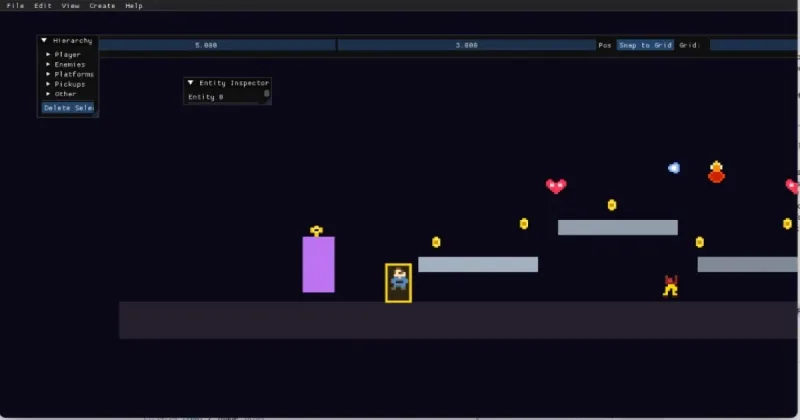

When I wrote Building A Modern C++ Game Engine from Scratch (Whiskers), the public demo was a space shooter. That was the right “hello graphics pipeline” project. Since then, Whiskers has been reshaped around what I actually want to ship: a 2.5D ECS platformer core, a bundled sample game with an in-engine editor, and a machine-readable debug surface so agents can play-test without pretending to mash keyboard macros in a screen recording.
In parallel, I’ve been porting Magicor—Peter Gebauer’s 2006 public-domain puzzle platformer—from Python/Pygame to C++ on top of Whiskers, while also shipping the original Python game in the browser via Pygbag. Today:
- magicor.org — full Python/Pygame port (touch controls, mobile auto-landscape, SHA-busted deploys)
- magicor.org/2/ — C++/Whiskers WebGL preview (the engine port in progress)
Both repos are still in motion; this post is a status snapshot, not a release announcement.
At a glance
- Whiskers Engine — ECS platformer runtime (physics, rendering, level JSON), native SDL2 + OpenGL, optional Emscripten/WASM, Catch2 tests, and a JSON-over-stdio debug protocol compiled in but only active when you pass
--debug-protocol. - Platformer demo — Sample game shipped with the engine: combat, pickups, parcel-delivery quest flow, two small levels, and an ImGui editor (toggle with F1).
- Magicor (Python) — Original Pygame codebase on branch
feat/add-wasm-port; Pygbag bundles it for the browser at magicor.org with on-screen touch controls, portrait auto-landscape layout, and git-SHA cache busting on deploy. - Magicor (C++) — Full game port in a separate repo, vendoring Whiskers as a submodule; 75+ levels across five worlds, ice/fire puzzle mechanics, title and level-select UI, native desktop binary, and browser artifacts at magicor.org/2/ (
magicor.js,.wasm,.data). - Agent playtesting — Optional MCP server (
magicor-cpp/tools/mcp_server.py) that launches the native binary with the debug protocol and exposesstep_frames,get_state,set_input, and friends to Cursor (or any MCP client). This is the same architectural bet as Agent-Driven Engineering: treat the running game as a forward model, not a video stream.
Whiskers: from space demo to 2.5D platformer
The engine repo (whiskers-engine) is mid-refactor on branch feature/2.5d-platformer-spec. The headline changes:
| Area | What changed |
|---|---|
| ECS | Stable entity handles, component queries, destruction, systems split by concern (input, physics, animation, camera, AI). |
| Physics | Fixed timestep, AABB collision, layers, moving platforms, platformer feel (coyote time, jump buffer, air control). |
| Rendering | Orthographic gameplay plane with depth layers for parallax-style 2.5D. |
| Levels | JSON level files under src/level/; load/clear through the debug protocol for tests. |
| WASM | platformer_web target via web/build_wasm.sh (same demo, browser-hosted). |
The platformer demo (platformer_demo / platformer_web) is intentionally a showcase, not the Magicor product. Full games (like Magicor) live in their own repositories and pull Whiskers in as a submodule or CMake package—see specs/platformer-demo.md in the engine tree.
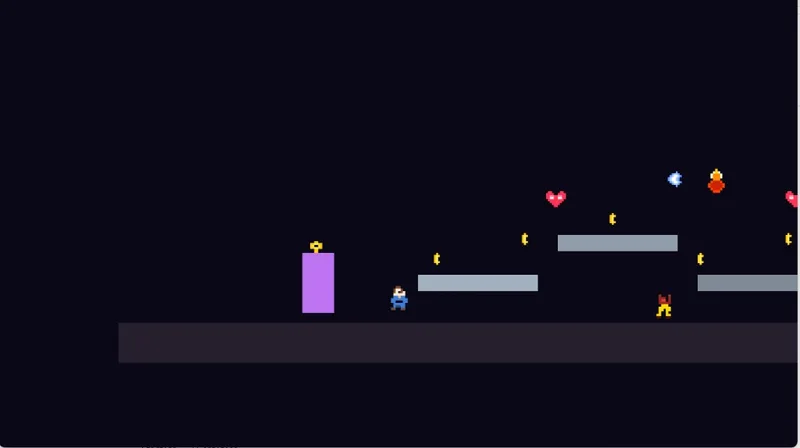
ImGui editor in the platformer demo
Press F1 in the demo to toggle the editor overlay. It is not a separate tool chain; it runs inside the game loop on top of the live GL viewport:
- Viewport picking — click entities in the 3D view; selection highlights draw in-scene.
- Panels — hierarchy, entity inspector, character editor, level tools, tile palette, level browser.
- Toolbar — grid snap, spawn position, Play/Stop to drop back into pure gameplay.
- Pixel Editor — paint sprite frames in ImGui and regenerate textures on the selected entities.
- Level Serializer — save/load/list JSON levels from disk (File → Level Browser, Save, etc.).
Some Create-menu entries are still stubs (enemy archetypes, undo/redo); the workflow that is wired—inspect, spawn, save levels, paint pixels—is what I use to iterate on demo content without leaving the running game.
Press F1 again to hide the overlay and play-test the level as a player.
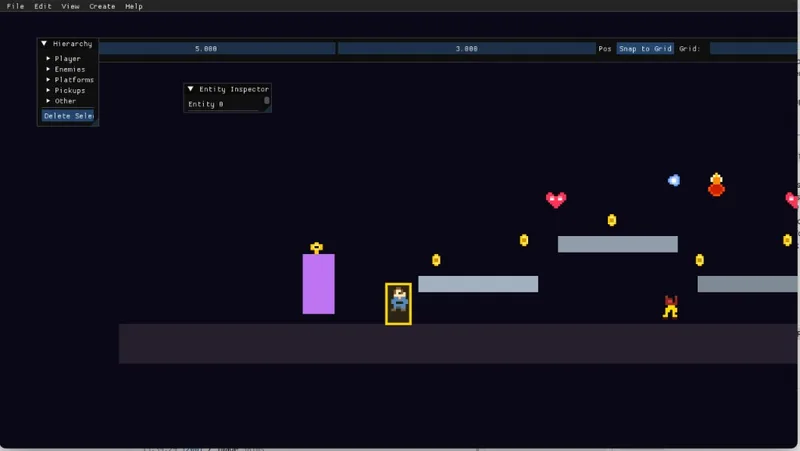
If you have only seen the old space demo write-up, mentally replace “asteroids in 3D” with “side-scroller with a delivery quest and an editor docked over the framebuffer.”
Debug protocol: agents talk to the sim, not the screen
Whiskers can be built with WHISKERS_DEBUG_PROTOCOL=ON (default on native). At runtime nothing listens until you start the binary with:
platformer_demo --debug-protocol [--headless]
Then the game speaks one JSON object per line on stdin/stdout: commands like get_state, set_input, input_frame, step, load_level, screenshot, get_physics_debug, pause, resume, quit. Decorative stdout is suppressed so every line parses cleanly.
Design goals (from specs/testing-debug-protocol.md):
- LLM agents can play-test programmatically (deterministic
step, not wall-clock sleeps). - Integration tests assert physics, collisions, and level load via Catch2 +
ctest. - CI can run headless on every PR.
get_state returns entity indices, types, positions, velocities, health, and collider bounds. screenshot returns a base64 PNG after the next full render—useful when you want visual confirmation without hooking OS-level capture APIs.
The protocol is optional at runtime on purpose: shipping builds and casual players never pay for a stdin thread or JSON parsing unless they opt in.
Magicor in the browser (two builds)
Magicor is a tile-based puzzle platformer: extinguish every fire, avoid hazards, manipulate ice (create, break, bridge, wall-stick rules), and use tubes—all across Egypt, Forest, Pompei, Snow, and Space (15 levels per world in the original data set).
Python/Pygbag at magicor.org
The production browser build is the faithful Python port, compiled with Pygbag to WebAssembly. Recent work on feat/add-wasm-port:
| Area | What shipped |
|---|---|
| Mobile UX | Virtual D-pad + action/menu buttons; auto-landscape layout in portrait (CSS rotate + fill viewport at 4:3, no stretch) |
| Deploy | magicor.org publishes magicor.{git-sha}.tar.gz bundles so browsers pick up new builds without hard refresh |
| Polish | Branded loading splash, readable copyright prompt, splash overlay torn down after load |
Play at https://www.magicor.org. Desktop Pygame builds are unchanged on main.
C++/Whiskers preview at magicor.org/2/
The C++ port (magicor-cpp) vendors Whiskers and implements Magicor-specific systems on top: ice slide/support, fire gravity, orb collection, hazard damage, win flow back to level select, and enriched debug snapshots (fires_remaining, feet_tile, level_complete, etc.) when the protocol is on.
The wasm preset produces:
magicor.js,magicor.wasm,magicor.data(preloadedassets/data)
Serve over http:// (not file://). The C++ preview lives at https://www.magicor.org/2/—linked from Stellar Whiskers as a Whiskers Engine title.
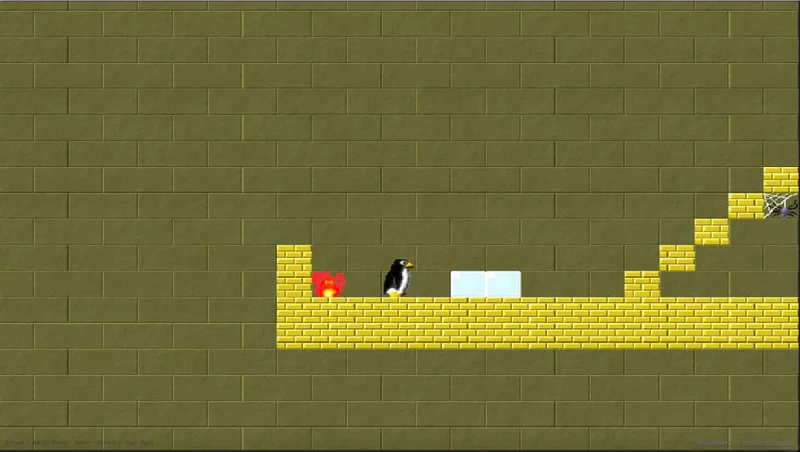
Recent port work has been unglamorous but visible in play: ice parity with the Python original (wall-stick only on one-sided walls, no stick over fire/lava, horizontal run caps, support under player-created ice). Batch playtests (tools/playtest_levels.py) walk every level from spawn and optionally run a greedy “try to put out fires” policy—honestly still a heuristic, not a solver; see specs/PLAYTEST_AND_SOLVER.md for where search/planning might go next.
MCP playtest bridge (optional)
Native Magicor (and the platformer demo binary, if you point env vars at it) can be driven from Python:
| Piece | Role |
|---|---|
tools/mcp_server.py | MCP server: spawns game with --debug-protocol, JSON RPC over stdio, stderr ring buffer + tools/.mcp-game.log |
tools/playtest_levels.py | Batch mobility + optional --solve fire-clear attempts |
| Cursor rule | .cursor/rules/magicor-playtest-exploratory.mdc — prefer walking the penguin over abusing teleport for repro |
Configure in Cursor’s MCP settings (example from the script header):
"magicor-playtest": {
  "command": "/path/to/magicor-cpp/tools/.venv-mcp/bin/python",
  "args": ["/path/to/magicor-cpp/tools/mcp_server.py"],
  "env": { "MAGICOR_BOOT_LEVEL": "levels/egypt/egypt-03.lvl" }
}
Typical agent loop: start_game → set_input / step_frames → get_state → repeat. For Magicor, map attack to ice manipulation and use jump for tubes—the README in the port repo documents the axis/action mapping.
WASM builds do not expose the stdio protocol in the browser (no practical stdin for a tab). Agent playtesting today means native binary + MCP, or Chrome DevTools MCP for manual inspection of the live site—not the same integration, but enough to catch WebGL/sandbox issues.
This connects directly to the workflow in Agent-Driven Engineering: specs and tools stay stable; the hosting contract changes per target (Lambda for Hermes, stdio JSON for Whiskers/Magicor, CDP for web games).
Architecture (today)
flowchart LR
  subgraph whiskers ["Whiskers Engine"]
    ECS[ECS + Physics]
  end
  subgraph demos ["Demos / games"]
    PD[platformer_demo + ImGui editor]
    PY[magicor Python WASM]
    MG[magicor C++ / WASM]
  end
  subgraph agents ["Optional agents"]
    MCP[mcp_server.py]
    PT[playtest_levels.py]
  end
  ECS --> PD
  ECS --> MG
  PY --> WEB[www.magicor.org]
  MCP -->|stdio JSON| MG
  PT -->|subprocess| MG
  MG -->|deploy| WEB2[magicor.org/2/]
What’s still in progress
- Engine: finish 2.5D spec items (editor Create menu, broader test coverage, polish WASM path for
platformer_web). - Magicor: ice/fire edge cases, level parity audits, smarter search than the current greedy
--solvepolicy. - Editor: undo/redo and more entity templates wired to spawn APIs.
- Agents: richer MCP tools (level sweep reports in CI), without conflating heuristic playtests with “solved.”
Neither repo is tagging a 1.0 yet. The interesting milestone is already real: same engine, desktop debuggability, browser shipping, and an agent-facing protocol when you want continuous agency on game logic—not just on TypeScript.
Repos and links
- Whiskers Engine: github.com/rhelmer/whiskers-engine (branch
feature/2.5d-platformer-spec) - Magicor (Python): github.com/rhelmer/magicor (
feat/add-wasm-port) - Magicor C++ port: github.com/rhelmer/magicor-cpp
- Play Python WASM: https://www.magicor.org
- Play C++ preview: https://www.magicor.org/2/
- Earlier engine post: Building A Modern C++ Game Engine from Scratch (Whiskers)
- Agent workflow: Agent-Driven Engineering